
Search engine optimization (SEO) reporting is messy. Broad metrics from raw keyword ranking data are often misleading. You might monitor a dozen or a few hundred keywords, but do they all matter equally?
No.
Some are foundational to your strategy, whether capable of delivering high traffic or just a crucially-targeted trickle; others are there for reference or to keep tabs. Some fall in the middle. That’s where statistical weighting comes in, a concept that most SEO reporting vendors haven’t implemented.
What are Statistical Weights? Remember school Grades?
Let’s pretend your SEO campaign is a student taking a class. The broadest KPI of your SEO report (e.g., “visibility score”) is the final grade. Some assignments (keywords) are worth more than others. A throwaway homework assignment or pop quiz doesn’t count as much as the midterm or final. Statistical weighting ensures you’re not giving equal importance to every assignment, er, uh… keyword.
Most SEO Tools Don’t Offer Custom Keyword Weighting
A quick check shows that most SEO reporting tools still don’t offer user-defined weighting. That’s a problem. Your keyword scope likely isn’t uniform, and your reporting shouldn’t be either. Statistical keyword weighting wasn’t in my criteria when I last compared SEO reporting vendors back in 2018. Live and learn.
Some vendors offer automatically weighted metrics, called “Share of Voice,” “Visibility Index,” and so on. But they typically base their weighting on search volume, not business priorities. Popularity isn’t the same as value, and treating the two as interchangeable is a fundamental flaw in these metrics.
The Problem with Naive Keyword Weighting
Automatically weighting keywords by search volume or estimated click-through rates might help estimate potential traffic, but it’s a naive way to measure SEO campaign success. Search volume tells us nothing about a keyword’s business value, profitability, or strategic importance. A low-volume keyword might generate valuable leads while a high-volume keyword delivers nothing of consequence. Vendors shouldn’t make those decisions for us.
Why Statistical Weights Matter
Assigning weights to keywords:
- Reduces the noise from less important terms, e.g., prevents high rankings on lower-value search phrases from inflating search visibility metrics
- Helps stakeholders quickly identify critical keywords
- And otherwise provides broad SEO campaign metrics that better reflect your business priorities.
Choosing Statistical Weights: A Practical Guide
My former rank-reporting vendor, Rankinity (now defunct), allowed four weight settings:
- 100% weight: These are core business-driving keywords or notions you care about deeply for other reasons.
- 50% weight: These keywords have half the influence on broad KPIs as 100%-weighted keywords.
- 10% weight: A hint of weight.
- 0% weight: Keywords you want SERP data on but don’t want affecting visibility metrics.
And applied them to this viz score formula.
So what does choosing statistical weights for keywords look like in practice?
A Hypothetical Keyword Weighting Example
Let’s make a fictional company, Acme Widget Co., to illustrate how SEO statistical weighting works.
Acme Widget Co. sells widgets in various colors. (Especially blue!)
Because of patent trolls, Acme can’t sell green widgets, but Acme’s turquoise widgets have a greenish hue in the right light, if you squint.
Recently, their orange widgets have become considerably more expensive to produce. Furthermore, international demand has plummeted… something about tariffs. They won’t be selling many, but they want to keep tracking the term.
They also want to monitor their competitor’s popular TitanCo Widgets, but aren’t particularly interested in pursuing that traffic, especially given the potential trademark complications of optimizing for a competitor’s brand.
Here’s how they handle weighting:
- 100% Weight: blue widgets – their flagship product
- 50% Weight: green widgets – similar-ish to turquoise widgets?
- 10% Weight: orange widgets – SNAFU, but they’ll sell a little, maybe
- 0% Weight: TitanCo Widgets – a competitor term to track but not rank for.
Let’s see how these weights affect Acme’s overall visibility score under two different scenarios. Same keywords, same weights, but very different rankings.
For this example, we’re using a common visibility formula: a #1 ranking scores 100%, #2 scores 99%, and so on, down to 0% for keywords ranking beyond position 100 or not ranking at all. Each keyword’s score is multiplied by its assigned weight, and the total is divided by the sum of those weights.
| Keyword | Weight | Scenario A Rank | Scenario B Rank |
|---|---|---|---|
| Blue widgets | 100% | 20 | 1 |
| Green widgets | 50% | 5 | 8 |
| Orange widgets | 10% | 1 | 40 |
| TitanCo widgets | 0% | 1 | 80 |
| Unweighted visibility | 94.3% | 68.8% | |
| Weighted visibility | 86.9% | 95.4% |
Scenario A: Acme ranks well for less important keywords, inflating its unweighted visibility score. Weighting reveals weaker performance on its flagship product.
Scenario B: Acme dominates its most important keyword but ranks poorly for peripheral terms. Without weighting, its visibility looks much worse than its business priorities would suggest.
Same keywords, same weights. Weighting can move the score in either direction, depending on which keywords are performing best.
That might be enough to get you started. Want more?
Here’s what those weights look like in a real rank-tracking interface.
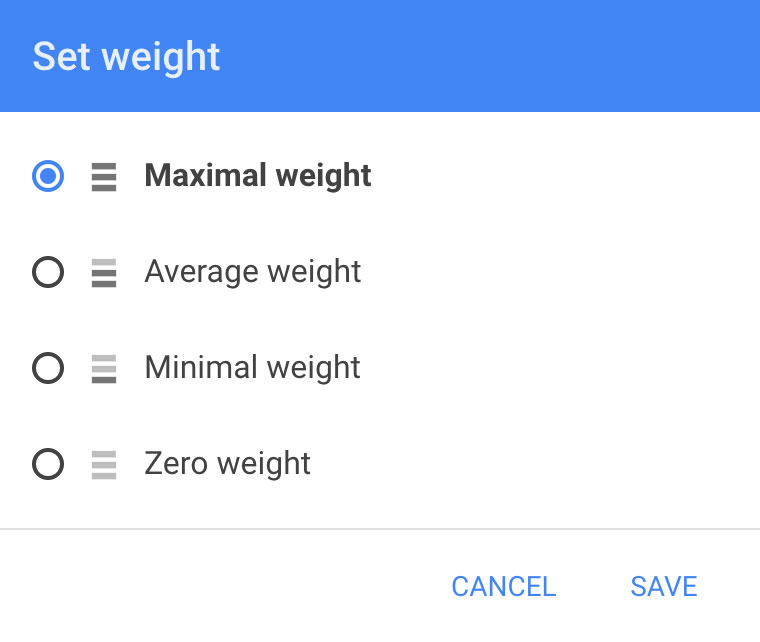
Real-World Weighting Nuance
Statistical weight reflects a keyword’s importance to our overall reporting metrics, but that doesn’t necessarily reflect how urgently we should work on it.
Convenient visual cues ensure relative weights are easily discernible at a glance, so writers and others on the SEO crew become accustomed to using those little weight-icons to prioritize and deprioritize targets. But sometimes we want to prioritize lower-weighted keywords.
For example, Acme hasn’t worked on the keyword “polka-dot mini widget” yet. It isn’t a hero by any measure, but insights (we rank gangbusters for every other sort of mini widget) suggest it’s low-hanging fruit. A quick nudge to existing on-site language should launch us to the top of the first SERP. We should probably try! But if we set it to 50%, 10%, or 0% weight, it won’t draw attention from the beleaguered brigade in the busy SEO trenches. What to do?
Keyword Groups
While we can’t have two weights for one keyword, we have another taxonomical tool: keyword groups. Keywords can be assigned to as many overlapping groups as we want. So let’s abuse our Acme case study some more. We’ll put the mini widgets into a “mini” group and toss the mini polka-dot widget and a few other temporarily-needs-attention keywords into another appropriately named “temp attention” group.
Mini widgets (of every color) are all only 10% weight, so even though Acme is kicking ass (#1 for all of ‘em!) that success lends little to the broad visibility score. But when we look at only the “mini” group, we’ll show 100% visibility for it. (We’re doing as well there as we can.) That is, until Acme tosses the non-ranking polka-dot mini widget keyword in the mix. They don’t rank for it, but they haven’t tried. And now the SEO content squad sees that it (and some other keywords) are a “needs attention” priority, despite their low statistical weight.
If your keyword scope is narrow and there’s only one person on your content squad, you might not need this stuff now, but it’s a good idea to plan for smart growth.
The Interface Challenge: Why Don’t More Tools Support Weighting?
I’m frustrated by the considerable statistical gap between what Rankinity calls “maximal” (100%) and “average” (50%) weights. But you can’t please everybody, and UX/UI is a struggle in the statistical weighting game.
While designing Reddaddo (my Reddit data aggregation and filtering thing), we opted to give users finer control over statistical weights, but the interface and UX are clunkier because of it. We’ll likely switch to a tiered weighting system without such a big gap between the two weightiest options, but that’s a nontrivial UI investment even with Reddaddo’s nascent technical debt.
Implementing keyword weighting is easy from a programming and computational standpoint, but it is a nightmarish UI/UX challenge. I shudder to think what it would take for Ahrefs, Moz, Semrush, et al to implement statistical weighting elegantly.
So get to it!
You’ve found a vendor that supports weighting. Great. How will you choose to weigh keywords?
Two people rarely weigh them exactly the same way, so ask all relevant stakeholders what they think. Even with hundreds of keywords, it’s easy to opine with a 0, 1, 2, or 3 next to each in a spreadsheet, representing from 0% to 100%. A worthy investment.
As you set weights, you’ll naturally start questioning whether some keywords even belong in the mix. This is a convenient time to consider removing or adding keywords. When’s the next time you’ll analyze the whole keyword scope so critically?
Revisit weights periodically as business priorities change. And beware: changing weights may also change historical visibility scores, depending on your reporting tool. Make sure you understand how your vendor handles this before comparing performance over time.
Keyword Weights FUD
If you’re not weighting keywords, your reports are lying to you. How will you fix that?
Statistical SEO keyword weighting makes SEO reporting more meaningful and actionable, avoiding noise and helping to align SEO work with business goals, but most vendors ignore it. Rankinity made this easy and affordable. If you find another vendor that does this, tell me about it in the comments and I’ll update this piece.
–
Dan Dreifort consults on SEO, UX, HR, and other nerdy stuff. Lately, he’s been collaborating with Gabriel Dice on the art installation known as Jean-Clare. J-C’s been in-progress since 2019! It will have its own nerdy blog post here this year or next. Thanks for reading!


Thanks, Dan. This piece is why the Organic Rank Tracker in SEO Utils (https://seoutils.app) now has statistical weighting. You set each keyword’s weight yourself: Full, High, Medium, Low, Minimal, Track only, or a custom value. Weighted average position, ranking coverage and visibility then follow those weights, and nothing is derived from search volume. Track-only (0%) keywords are still tracked but don’t count toward the score. Tags give you your “attention” groups without touching the weights. On your point about historical scores: past scores are recalculated with the current weights, so a chart never mixes old and new weightings.
Excellent! I’ll update the article accordingly ASAP. Thank you, Phuc!